import pandas as pd

penguins = pd.read_csv("assets/data/penguins.csv", sep=" ")
bill_mass = penguins[["bill_length_mm", "body_mass_g"]].dropna()
bill_mass.head()| bill_length_mm | body_mass_g | |
|---|---|---|
| 0 | 39.1 | 3750 |
| 1 | 39.5 | 3800 |
| 2 | 40.3 | 3250 |
| 3 | 36.7 | 3450 |
| 4 | 39.3 | 3650 |
To illustrate the linear model for regression, let’s predict a penguin’s body mass, in grams, from its bill length, in millimetres (Horst et al. 2020).
import pandas as pd
penguins = pd.read_csv("assets/data/penguins.csv", sep=" ")
bill_mass = penguins[["bill_length_mm", "body_mass_g"]].dropna()
bill_mass.head()| bill_length_mm | body_mass_g | |
|---|---|---|
| 0 | 39.1 | 3750 |
| 1 | 39.5 | 3800 |
| 2 | 40.3 | 3250 |
| 3 | 36.7 | 3450 |
| 4 | 39.3 | 3650 |
import matplotlib.pyplot as plt

fig, ax = plt.subplots(figsize=(6, 4.5))
ax.scatter(bill_mass["bill_length_mm"], bill_mass["body_mass_g"], alpha=0.5)
ax.set_xlabel("Bill length (mm)")
ax.set_ylabel("Body mass (g)")
plt.show()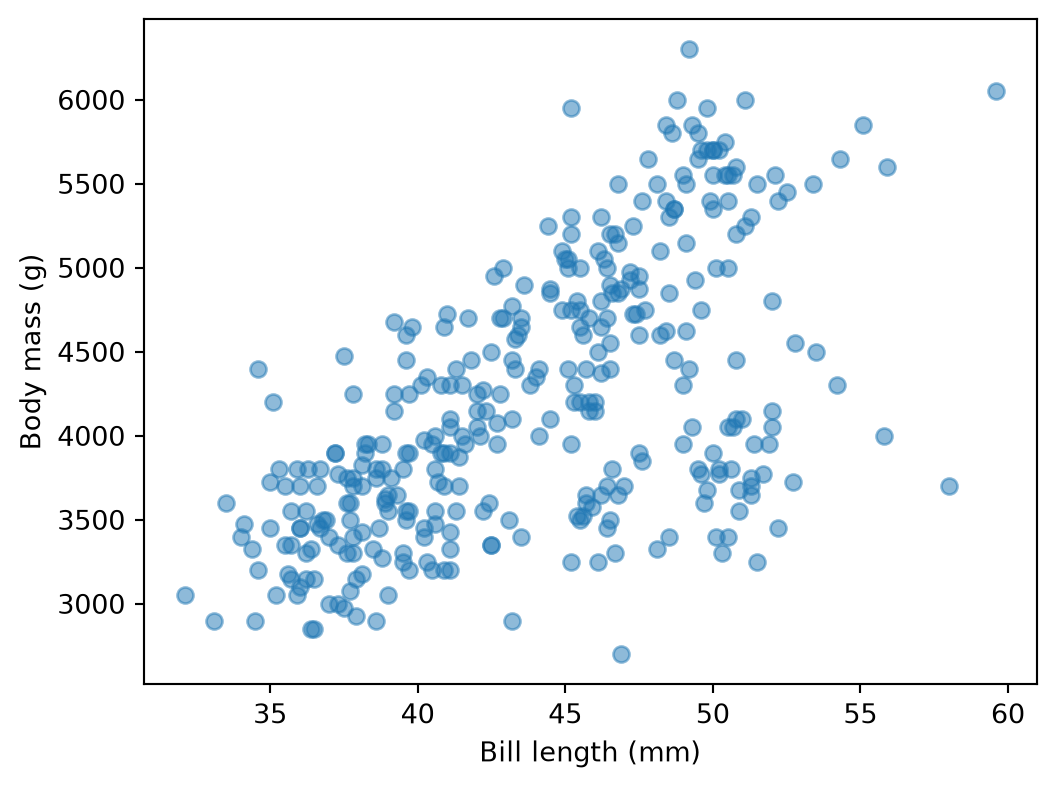
A line is a reasonable guess for the shape of this point cloud. For one penguin \(i\), with bill length \(x_i\) and mass \(y_i\):
\[y_i \approx w_0 + w_1 x_i\]
where \(w_0\) and \(w_1\) are coefficients to estimate. Stacking every penguin into a vector, with \(X\) the two-column matrix \([1, x]\) (a column of ones for the intercept, then the bill lengths):
\[y \approx Xw, \qquad w = (w_0, w_1).\]
Vocabulary, some of which we’ll reuse for the rest of the course:
Here, “predictor” is the input column \(x\). In scikit-learn, a predictor is also any object with a .predict() method; a LinearRegression instance is a predictor too. Context makes it clear which one is meant.
To judge candidate lines against each other, we need a way to score them. For a given \((w_0, w_1)\), the model predicts \(\hat{y}_i = w_0 + w_1 x_i\), and the residual is \(r_i = y_i - \hat{y}_i\). As in chapter 4, we average the squared residuals into the mean squared error, and rescale it into \(R^2\):
\[\text{MSE} = \frac{1}{n}\sum_{i=1}^n r_i^2 \qquad\qquad R^2 = 1 - \frac{\text{MSE}}{\text{Var}(y)}\]
Fitting the line means choosing \((w_0, w_1)\) to minimise the MSE (or maximise \(R^2\)).
When the line on the left moves, the marker on the right slides across the bowl. The bowl shape is expected: for a linear model, the MSE is a quadratic function of \((w_0, w_1)\), so it always has exactly one minimum, a unique best line.
In machine learning terminology, the penguins shown in the plot above are the training set. Sliding \((w_0, w_1)\) to the bottom of the bowl, by hand, is exactly what a learning algorithm does automatically: search over the hypothesis class of lines for the one minimising training error.
Before judging how good our fit is, it helps to see what a perfect linear relationship looks like. Degrees Celsius convert to degrees Fahrenheit by \(F = 32 + 1.8 C\), exactly:
from sklearn.linear_model import LinearRegression

celsius = pd.DataFrame({"celsius": [0, 10, 20, 30, 37, 100]})
fahrenheit = celsius["celsius"] * 1.8 + 32

reg_temp = LinearRegression().fit(celsius, fahrenheit)
print(f"w0 = {reg_temp.intercept_:.4f}, w1 = {reg_temp.coef_[0]:.4f}")
print(f"R² = {reg_temp.score(celsius, fahrenheit):.4f}")
w0 = 32.0000, w1 = 1.8000
R² = 1.0000\(w_0\) and \(w_1\) land exactly on \(32\) and \(1.8\), and \(R^2 = 1\): every point sits precisely on the line, since the relationship is an exact line.
Bill length and body mass are nothing like that. Refitting the full data above yields \(R^2 \approx 0.37\): most of the variation in body mass is unrelated to bill length.
One way to do better: use more than one predictor. The general principle is the same when there are several explanatory variables \(x_1, \dots, x_p\) instead of one. For penguin \(i\):
\[y_i \approx w_0 + \sum_{j=1}^p w_j x_{ij}\]
or, in matrix form, with \(X\) now one column per predictor plus the intercept column:
\[y \approx Xw\]
Coming back to our example now with two predictors: let’s add flipper_length_mm to bill_length_mm.
With two predictors, every penguin is a point in 3D (bill length, flipper length, body mass) rather than 2D, and a line becomes a plane. Below, the intercept is fixed for simplicity; only the two coefficients can be changed.
Both coefficients together push \(R^2\) up to about \(0.76\), far above the single-predictor fit: flipper length carries information about body mass that bill length alone didn’t capture.
How does scikit-learn actually find coefficients like these? Collect the residual sum of squares, the sum of squared norms of residuals, as a function of \(w\):
\[\text{RSS}(w) = (y - Xw)^T(y - Xw) = \|y - Xw\|^2 = \sum_{i=1}^n \|y_i - w^T x_i\|^2\]
Its gradient is
\[\nabla \text{RSS}(w) = -2 X^T(y - Xw)\]
Setting the gradient to zero gives the normal equations \(X^TXw = X^Ty\), hence the closed form
\[\hat{w} = (X^TX)^{-1}X^Ty\]
This is exactly the bottom of the bowl from the sliders above: the one point where the gradient vanishes in every direction at once. scikit-learn solves this directly for LinearRegression.
reg = LinearRegression().fit(x2, y2)
print(f"intercept: {reg.intercept_:.2f}")
print(f"coefficients: {reg.coef_}")
intercept: -5736.90
coefficients: [ 6.04748753 48.14485912]reg.predict(x2[:3])array([3213.77910194, 3456.92239254, 3895.06411463]).fit(X, y) solves the normal equations above; .intercept_ is \(w_0\), .coef_ is \((w_1, \dots, w_p)\); .predict(X) computes \(Xw\) with the fitted coefficients.
The same model extends to several response variables at once (\(q\) of them): \(Y \approx XW\), with \(Y\) an \(n \times q\) matrix (one column per response) and \(W\) a \((p+1) \times q\) matrix (one column of coefficients per response). For one observation, \(y_i \approx W^T x_i\) is now a vector in \(\mathbb{R}^q\) instead of a single number. The sklearn code doesn’t change: LinearRegression().fit(X, Y) just accepts a 2D Y, and .coef_, .intercept_, and .predict(X) each has an extra dimension for the outputs.
Those coefficients are worth reading closely:
{name: float(c) for name, c in zip(["bill_length_mm", "flipper_length_mm"], reg.coef_)}{'bill_length_mm': 6.047487528852293, 'flipper_length_mm': 48.144859118211116}A large positive coefficient means increasing that predictor, holding the others fixed, pushes the prediction up a lot; a large negative one pushes it down a lot. A coefficient close to zero means that the predictor adds little once the others are already in the model. That doesn’t necessarily mean it’s unrelated to the target on its own; it may be correlated with another predictor that’s already doing the same job.
Here, flipper length’s coefficient (about 48 g per mm) dwarfs bill length’s (about 6 g per mm). However, it still only tells us about a millimetre of each, and the two predictors don’t vary by the same number of millimetres in practice. Let’s look at the variation of each predictor:
two_pred.std()bill_length_mm 5.459584
flipper_length_mm 14.061714
body_mass_g 801.954536
dtype: float64Flipper length varies more than bill length. A coefficient answers “per unit of \(x\),” and “per millimetre” is not the same question as “per typical amount this predictor actually varies by.” StandardScaler, from the previous chapter, centres each predictor to mean 0 and rescales it to standard deviation 1; refitting on the scaled predictors turns each coefficient into “per standard deviation,” which is a fair comparison across predictors, whatever their original units:
from sklearn.preprocessing import StandardScaler

x2_scaled = StandardScaler().fit_transform(x2)
reg_scaled = LinearRegression().fit(x2_scaled, y2)
{name: float(c) for name, c in zip(["bill_length_mm", "flipper_length_mm"], reg_scaled.coef_)}
{'bill_length_mm': 32.96845896241179, 'flipper_length_mm': 676.0087345337205}Centring also makes the intercept interpretable: with every predictor centred at 0, \(w_0\) is just the predicted body mass for an average penguin, rather than the (meaningless, since no penguin has a 0mm bill) prediction at \(x=0\). Scaling changes the numbers in .coef_ and .intercept_, but not the fitted plane itself, the predictions, or \(R^2\); it only changes the units in which the coefficients are expressed.
With several predictors, especially correlated ones, OLS coefficients can swing around: a predictor’s coefficient has to absorb not just its own relationship with \(y\), but also whatever its correlated neighbours leave unexplained. Regularisation controls this by adding a penalty on the size of \(w\) to the fitting objective, trading a little bias for less variance (chapter 7 makes that trade-off precise).
Ridge regression adds an \(L_2\) penalty on the coefficients to the RSS:
\[\text{RSS}_{\text{ridge}}(w) = \|y - Xw\|^2 + \lambda \sum_{j=1}^p w_j^2\]
Larger \(\lambda\) shrinks every coefficient toward zero; \(\lambda = 0\) recovers ordinary least squares. The intercept \(w_0\) is left out of the penalty, since there’s no reason to shrink the overall level of \(y\). Setting the gradient to zero gives a closed form much like the one for OLS:
\[\hat{w} = (X^TX + \lambda I)^{-1}X^Ty\]
Lasso regression swaps the penalty for an \(L_1\) norm:
\[\text{RSS}_{\text{lasso}}(w) = \|y - Xw\|^2 + \lambda \sum_{j=1}^p |w_j|\]
This has no closed form, since \(|\cdot|\) isn’t differentiable at zero, so scikit-learn solves it iteratively. The practical difference from ridge: lasso can push a coefficient to exactly zero, dropping that predictor from the model entirely, while ridge only ever shrinks coefficients toward zero without reaching it. Lasso performs feature selection as a side effect of regularisation.
Both penalties treat every coefficient’s size the same way, in whatever units it happens to be measured in. Without scaling first, a predictor measured in millimetres would be penalised far more than the same relationship measured in metres, for no principled reason. Standardise predictors (as above) before fitting either model; scikit-learn does not do this for you.
Let’s bring in a third predictor, bill_depth_mm, and compare how ridge and lasso coefficients move as the penalty strength \(\alpha\) (scikit-learn’s name for \(\lambda\)) grows.
from sklearn.linear_model import Ridge, Lasso

alphas = np.logspace(-1, 3, 30)
ridge_coefs = [Ridge(alpha=a).fit(x3_scaled, y3).coef_ for a in alphas]
lasso_coefs = [Lasso(alpha=a).fit(x3_scaled, y3).coef_ for a in alphas]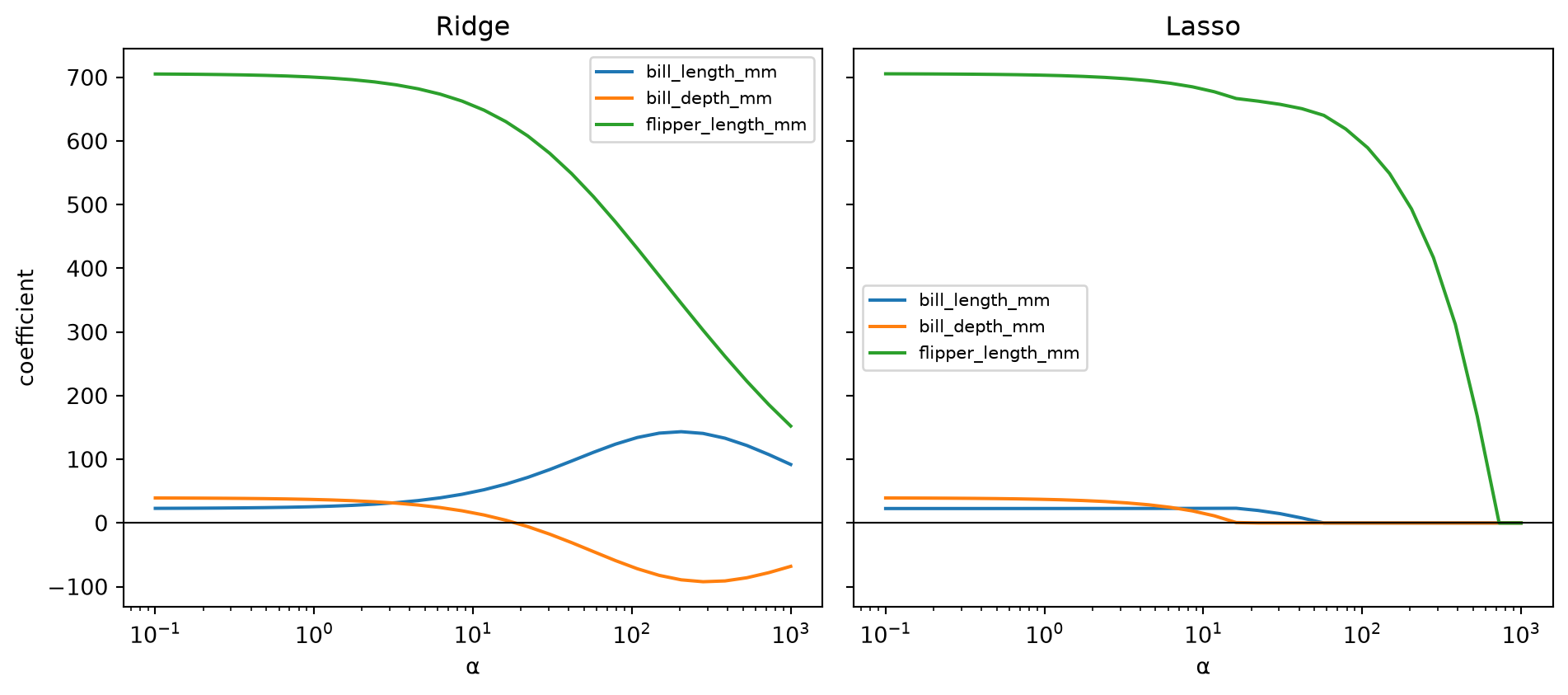
Both paths start at the OLS solution (small \(\alpha\)) and shrink as \(\alpha\) grows. Ridge’s three lines curve toward zero together but never land on it exactly. Lasso’s lines reach zero outright: bill depth first, then bill length, leaving flipper length, the strongest predictor, alone the longest.
ridge30 = Ridge(alpha=30).fit(x3_scaled, y3)
lasso30 = Lasso(alpha=30).fit(x3_scaled, y3)
{name: (round(float(r), 1), round(float(l), 1)) for name, r, l in zip(labels3, ridge30.coef_, lasso30.coef_)}
{'bill_length_mm': (83.4, 14.9),
'bill_depth_mm': (-17.0, 0.0),
'flipper_length_mm': (581.9, 657.9)}At \(\alpha = 30\), lasso has already dropped bill depth from the model entirely, while ridge still assigns it a small, nonzero coefficient (its sign has even flipped, a symptom of how correlated it is with the other two predictors).
Which penalty to use, and how large \(\alpha\) should be, aren’t questions the training RSS can answer: minimising training RSS alone always picks \(\alpha = 0\), plain OLS, since any penalty can only make the training fit worse. Like max_depth or \(k\), \(\alpha\) is a hyperparameter, chosen by cross-validation rather than by fitting on the training set directly; RidgeCV and LassoCV automate exactly that search. Chapter 7 explains why turning \(\alpha\) up trades fit for stability.