5First model and model selection/evaluation with scikit-learn
In this chapter we build our first real classifier, and learn to check whether it actually works. We’ll meet the small set of conventions, the scikit-learn API, that let us fit, predict, and score any model the same way, and see why scoring a model on the data it was trained on can be dangerously misleading. Along the way we’ll define overfitting, the difference between model selection and model assessment, and a handful of metrics for judging classifiers and regressors.
5.1 Learning a class from examples
In an earlier chapter, an ornithologist told us that Adelie penguins have shorter bills than Chinstrap or Gentoo penguins. That’s already a rule for telling species apart — a hypothesis. Let’s write one down ourselves and see how well it does.
Take just two species, Adelie and Gentoo, and two measurements, bill length and flipper length:
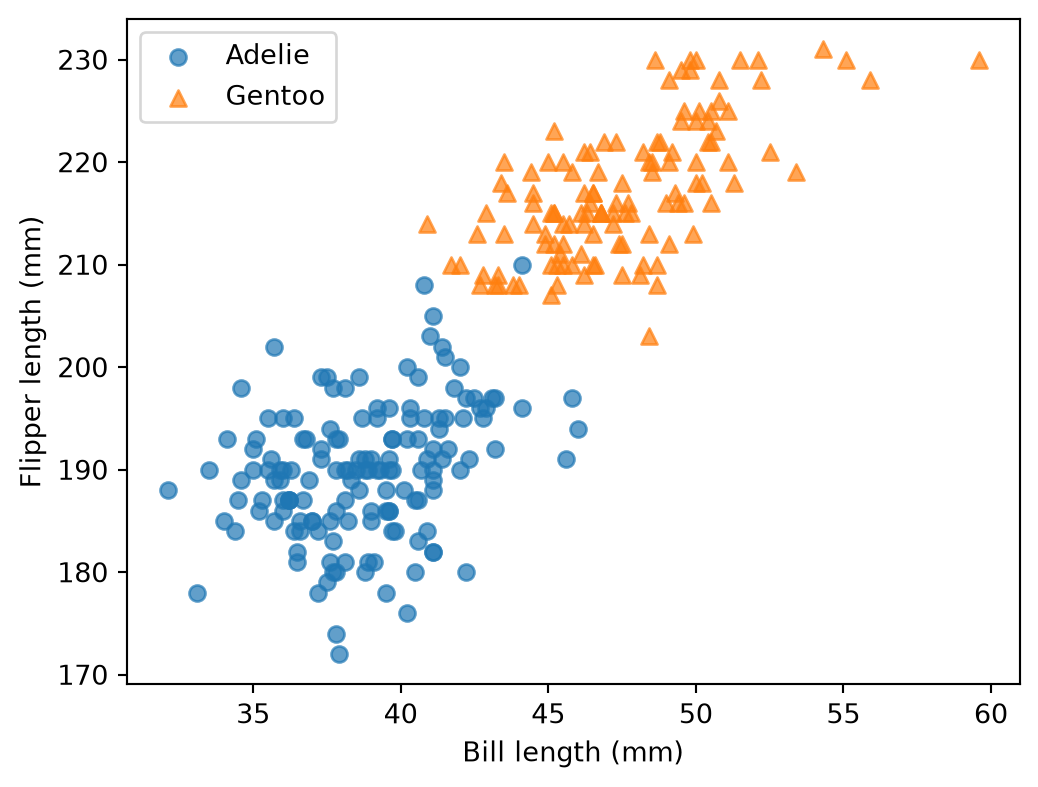
Figure 5.1: Adelie and Gentoo penguins, plotted by bill length and flipper length. Each point is one penguin.
The two species form two fairly distinct clouds of points. Let’s find a rule that distinguishes the two.
Looking at Figure 5.1, a simple rule is “predict Gentoo if flipper length is above roughly 205mm.” That’s a hypothesis, and we can check how well it does on the very data we used to come up with it, by counting how many of these penguins it gets wrong. The error rate on the data used to build the rule is the hypothesis’s empirical error (or training error)
Note
Here is the confusion matrix for this rule. Can you compute the accuracy from it?
predicted = two_species["flipper_length_mm"].apply(lambda x: "Gentoo"if x >205else"Adelie")pd.crosstab(two_species["species"], predicted, rownames=["True"], colnames=["Predicted"])
Predicted
Adelie
Gentoo
True
Adelie
149
2
Gentoo
1
122
However, we don’t really care about the training error. We’re not going to predict what we already know. Rather, the rule should work on new unseen penguins. Generalisation is the ability of a hypothesis, learned from a finite training sample, to perform on the whole population. We can compute the training error exactly, but not the generalisation error, since we don’t have access to “every penguin that will ever exist.” The best we can do is estimate it by holding out some of the data and pretending we don’t know it when we build the rule.
A learning algorithm automates the part we just did by eye. Instead of eyeballing a threshold on a single plot, it systematically searches over many candidate rules and selects the one that best fits the training data. The set of candidate rules that can be searched over is called the hypothesis class. Restricting it to “one threshold on flipper length” yields a small, simple hypothesis class; allowing it to use both features, or combine them in more complex ways, yields a much larger one. The choice of hypothesis class is itself a choice we make, and, as we’ll see, a bigger one isn’t automatically better.
Let’s do that for real, with all three species and all four measurements, using scikit-learn.
Watch out: the word “predictor” can mean 2 things in our context:
The predictor is the input variable X.
In scikit-learn’s lingo, a predictor is any Python object that has a .predict() method.
Context usually makes it clear which one is meant.
5.3 The scikit-learn API: estimator, predictor, transformer
Every model in scikit-learn follows the same small set of conventions, which is what lets us swap LogisticRegression for KNeighborsClassifier for a LinearRegression without changing how we call them.
Any object with a .fit() method is called an estimator. If it additionally has a .predict() method, it’s called a predictor: classifiers and regressors are predictors. If it additionally has a .transform() method, it’s called a transformer: scalers and encoders are transformers (more on these in a later chapter).
The method .fit(X, y) does two things:
it calls a learning algorithm (how to search for a good rule) and
it updates the model state (the rule parameters).
Both are specific to the type of model: a LogisticRegression and a KNeighborsClassifier learn completely differently and store completely different states, but you call .fit() on both the same way.
Let’s fit a k-nearest neighbours classifier. To predict the species of a new penguin, it looks at its k closest neighbours in the training data (by measurements) and predicts the majority species among them.
from sklearn.neighbors import KNeighborsClassifiermodel = KNeighborsClassifier()model.fit(X_penguins, y_penguins)
KNeighborsClassifier()
In a Jupyter environment, please rerun this cell to show the HTML representation or trust the notebook. On GitHub, the HTML representation is unable to render, please try loading this page with nbviewer.org.
Rather than checking predictions one by one, .score() does this for the whole dataset at once. For a classifier, it computes accuracy directly:
model.score(X_penguins, y_penguins)
0.8391812865497076
Note
.score(X, y_true) is shorthand for “predict, then compare to the truth with a default metric.” It calls .predict(X) internally and feeds the result, along with y_true, to a scoring function: accuracy for classifiers, \(R^2\) (the coefficient of determination)1 for regressors. It’s the same idea as accuracy_score(y_true, y_pred) from the previous chapter, just bundled into one call on the model itself.
Warning
We just scored the model on the training data (X_penguins, y_penguins). This score is a case of what’s called the optimism of the training error rate: a model’s error on its own training data is, on average, smaller than on new data. That optimism tends to get worse the more flexible the model is. As flagged above, this tells us almost nothing about how the model will do on a new penguin.
5.4 Train-test split: a naive approach
The fix is to hold out part of the data: fit on one chunk (training data), score on the other (testing data) that the model never saw during .fit().
A first, naive idea: use the first half of the rows for training and the second half for testing.
n =len(X_penguins)X_train = X_penguins[: n //2]y_train = y_penguins[: n //2]X_test = X_penguins[n //2 :]y_test = y_penguins[n //2 :]model.fit(X_train, y_train)model.score(X_test, y_test)
0.023391812865497075
The performance is quite poor. Let’s see why:
y_train.value_counts()
species
Adelie       151
Chinstrap     20
Name: count, dtype: int64
y_test.value_counts()
species
Gentoo       123
Chinstrap     48
Name: count, dtype: int64
WarningWhy the naive split fails
The rows in penguins.csv are grouped by species, not shuffled. Slicing by position means the training set ends up without any examples of a species. As a result, the model can’t possibly predict it correctly. The problem isn’t the model, but the train/test split.
Conclusion: the score you get depends on how you split.
5.5 Train-test split: the scikit-learn approach
train_test_split fixes this by shuffling the rows before splitting:
test_size=0.2 reserves 20% of the rows for testing;
random_state=42 makes the shuffle reproducible across runs (drop it, and you’d get a slightly different split and a slightly different score every time).
The number model.score(X_test, y_test) returns is our estimate of the generalisation error: the testing score, unlike the training score, is not an optimistic estimate because X_test/y_test were not used in fitting the model.
Note
Even a random split gives a score that depends on which rows happened to land in the test set. Run the split again with a different random_state, and the number moves around a bit. A single train-test split tells you “how did the model do on this test set,” not “how good is the model, in general.” Cross-validation, below, is how we get a more complete picture.
5.6 Overfitting: memorising versus learning
Think of two students preparing for an exam. One studies by understanding the material; the other grinds through the exact set of practice problems the teacher handed out and memorises the answers. On the practice set, both students have a perfect score. On the real exam, which asks similar but not identical questions, the first student does fine, but the second falls apart. The second student had a training error of 0 and a generalisation error that was much higher because they memorised the training set rather than learning the underlying rule. This is overfitting.
Models can do the same thing. Given enough flexibility, a model can adapt to the training data so precisely that it makes zero training errors. They are memorising every training example. We can watch this unfold directly by controlling how flexible we allow a model to be. A decision tree’s max_depth is exactly such a flexibility knob: a shallow tree can only ask a few questions, while a very deep one can find a rule specific to each training penguin.
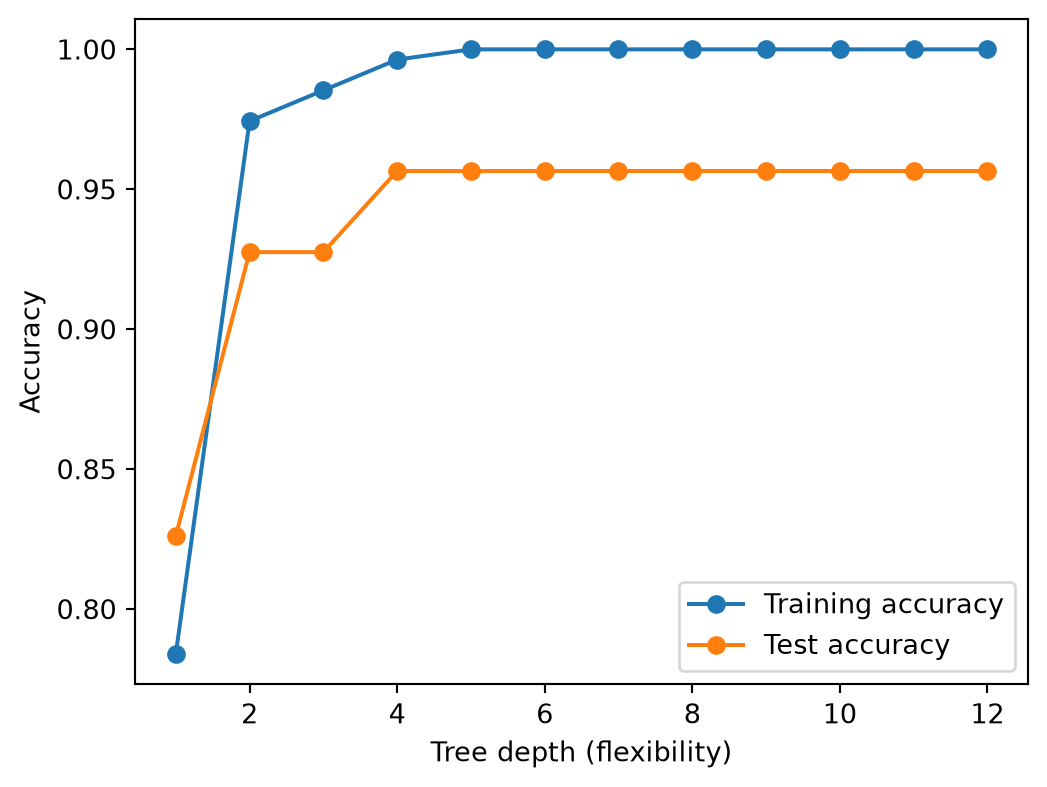
Figure 5.2: Training and test accuracy of a decision tree, as it is allowed to grow deeper. Training accuracy climbs to a perfect score; test accuracy plateaus well below it.
Training accuracy hits a perfect 1.0 as the tree is allowed to grow deeper. Test accuracy, our estimate for the generalisation error, remains below the training accuracy: extra depth leads to memorisation, not learning. The gap between the two curves is the optimism of the training error rate.
Note that the leftmost point (max_depth=1) is bad on both curves: too shallow a tree hasn’t learned enough to do well even on the training data. That’s the student who didn’t study at all. Good generalisation sits in between: enough flexibility to capture the real pattern, not so much that the model starts memorising.
To illustrate memorisation, let’s use Adelie and Chinstrap, along with the features bill_length_mm and bill_depth_mm. The cell below fits a tree at every depth from 1 to 10 and, shows the decision boundary.
314068
db =FileAttachment("assets/data/decision-boundary.json").json()
Figure 5.3: Decision regions of a decision tree separating Adelie and Chinstrap penguins, at the chosen depth. Points are the training penguins.
md`At depth **${depth}**, the tree has **${db.stats[depth].leaves}** leaves and a training accuracy of **${(db.stats[depth].train_accuracy*100).toFixed(1)}%**.`
At depth 1, the tree can only make straight cut, leaving plenty of training points on the wrong side. As depth increases, the boundary adapts to each penguin until it perfectly classifies every training example. The (overfitted) learned decision boundary is almost certain not to hold for the next Adelie or Chinstrap that comes along.
5.7 Cross-validation
Cross-validation repeats the train/test split multiple times, using a different chunk of data for testing each time, so we see how much the score actually varies rather than trusting a single split.
By hand, with KFold.KFold divides the data into k equal folds; each fold takes a turn as the test set while the rest form the training set.
Look at the spread across those five scores with shuffle=False on data that’s grouped by species. Some folds are much less representative than others, for the same reason the naive split failed above. KFold(shuffle=True, random_state=...) fixes it the same way train_test_split did:
Report both the mean and the standard deviation: the mean tells you how good the model is on average, the standard deviation tells you how much the performance varies.
cross_val_score (and KFold) don’t care what kind of predictor model is. They only rely on its .fit(), .predict(), and .score() methods. Swap in a LogisticRegression or a DecisionTreeClassifier and the same code works. scikit-learn provides several other cross-validation strategies in addition to KFold. See the cross-validation iterators documentation and many more tools in sklearn.model_selection.
5.8 Model selection versus model assessment
Looking at the Decision Tree example above, we can see that the test score depends on the hyperparameter max_depth. A deeper tree is more flexible and can fit the training data better, but it also overfits more easily. The best depth is somewhere in between. If we went on to pickmax_depth=4 because it had the best test score, and then reported that same test score as “the” accuracy of our final model, we’d be back to an optimistic number: the test set would have influenced the choice of model, so it can no longer properly assess that model. This distinction has a name:
Model selection: estimating the performance of several candidate models (or hyperparameter settings like different tree depths, different values of k, different algorithms entirely) to choose the best one.
Model assessment: having chosen a final model, estimating its prediction error (its generalisation error) on data that played no role whatsoever in choosing it.
Cross-validation is the right tool for model selection. The correct protocol is to set aside a final test set before doing any model selection, and to touch it exactly once, at the very end:
Model selection happens entirely inside the first for loop. The decision tree performs best, so we refit it on all of X_train and evaluate it on X_test exactly once; the resulting number is our best estimate of the generalisation error.
In a classification problem, .score() reports accuracy: the fraction of predictions that were correct. Accuracy is easy to read but hides what kind of mistakes a model makes, which matters a lot when classes are unevenly represented.
To illustrate, let’s look at the confusion matrix for the KNeighborsClassifier on the penguin test set.
Rows are the true species, columns are the predicted species; the diagonal counts correct predictions, and everything off the diagonal is a mistake. From this table, we can define, for any one class:
Precision: of the penguins the model predicted as this species, what fraction actually are?
Recall: of the penguins that actually are this species, what fraction did the model catch?
F1 score: the harmonic mean of precision and recall: \[F_1 = 2 \cdot \frac{\text{precision} \cdot \text{recall}}{\text{precision} + \text{recall}}\]
from sklearn.metrics import classification_reportprint(classification_report(y_test, y_pred))
Assume a binary classification task with a “positive” and a “negative” class. For instance, the prediction of the presence of cancer (“positive”) or the absence (“negative”).
A True Positive (TP) means that you have correctly (truly) predicted that an instance is part of the Positive class. A cancer patient was correctly identified to have cancer.
A False Positive (FP) means you predicted it’s in the positive class, but it’s not (your prediction is False). A healthy patient was incorrectly predicted to have cancer.
Similarly, a True Negative (TN) means you have correctly predicted it to be part of the Negative class. A healthy patient correctly predicted to be healthy.
A False Negative (FN) means you have falsely/incorrectly predicted the negative class for an instance. A patient with cancer was detected as healthy.
Accuracy is the proportion of times that your model is correct, out of all its predictions:
This can be useful, but it can be a poor metric if your data is imbalanced (a lot more of one class than the other). Your model could achieve high accuracy by only ever predicting one class, which is a pretty useless model. For instance, most people won’t have cancer, so a model trained on a representative sample could have great TN and terrible TP, but high accuracy because negative examples make up most of your instances.
Precision is your proportion of correct positive predictions: \[\text{Precision} = \frac{\text{TP}}{\text{TP}+\text{FP}}.\]
If you predict no cancer for almost everyone, this will be very high (low TP, high FP). As with accuracy, this metric doesn’t work in isolation because it doesn’t account for making too many negative predictions.
Recall is your proportion of positive examples that you correctly predicted:
Note that this is not “just precision but flipped to negatives”! Since each FN (in binary classification) is necessarily you misclassifying a positive example as negative, more FNs mean you’re worse at predicting positive examples. A model could achieve a very high Recall by predicting cancer for everyone, which clearly isn’t right.
With more than two classes (multiclass classification), precision, recall, and F1 are computed one class at a time, treating that class as “positive” and every other class as “negative”. Then, they are combined into a single number, using two different strategies:
Macro-average: compute the metric for each class separately, then average the per-class numbers, unweighted. Every class counts equally, no matter how many examples it has.
Micro-average: pool every prediction across all classes first, then compute one metric from the totals. Common classes dominate.
Notice the gap: Chinstrap is the rarest species in the test set, and the model does poorly on it, which drags the macro-average down hard; the micro-average, dominated by the two larger classes, barely notices. Neither number is “wrong”; they answer different questions:
“On average, how good is the model on each class?”, or
“On average, how good is the model on each observation?”
5.10 Side note: MSE and MAE
The metrics above are for classification. For regression, where the target is a numeric value rather than a class, the two most common error metrics are mean squared error (MSE) and mean absolute error (MAE). For \(n\) true values \(y_i\) and predictions \(\hat{y}_i\):
Both average the prediction errors over the test set, but they disagree on how to penalise a single bad miss:
MSE squares each error before averaging, so a handful of large misses dominate the score. A model with one huge error looks much worse under MSE than one with many small errors. In practice, we almost report its square root instead, the RMSE (root mean squared error), which is expressed in the target’s own units.
MAE averages the absolute errors directly, so every error counts in proportion to its size. No extra penalty for large misses. It stays more robust when a few outliers are present.
You’ll also often see \(R^2\) (the coefficient of determination) reported alongside MSE, since it’s really the same quantity on a different scale: \(R^2 = 1 - \text{MSE} / \text{Var}(y)\), i.e. one minus the model’s MSE relative to the MSE of the trivial model that always predicts the mean of \(y\). That normalisation is what makes \(R^2\) unit-free and roughly comparable across problems, unlike MSE or MAE.
Bill length alone is a mediocre predictor of body mass, so none of these numbers is great. RMSE and MAE are both expressed in grams, the target’s units, while \(R^2\) is unit-free (and, unlike the other three, higher is better).
5.11 Quick exercise: MSE vs. MAE
Two algorithms made predictions on the same 5 fake observations:
Which algorithm looks best according to the MSE? Which one looks best according to the MAE?
They don’t agree. Why? Look closely at pred_A and compare it to pred_B.
Which algorithm would you actually rather deploy?
5.12 Main takeaways
Any object with .fit() is an estimator; add .predict() and it’s a predictor. This shared structure lets us swap models without changing the surrounding code.
Never evaluate a model on the data it was trained on: the training error is an optimistic estimate of the generalisation error. The more complex models memorise the training set rather than learning from it; this is called overfitting.
A train-test split must be representative of the whole dataset, and use shuffling.
Cross-validation repeats the split to reveal how much a model’s score varies.
General process for building a model:
Split the data into training and test sets.
Use cross-validation on the training set to pick a model (or hyperparameter).
Fit the chosen model on all of the training data (model selection).
Evaluate it on the test set exactly once (model assessment).
Accuracy can hide uneven performance across classes; the confusion matrix, precision, recall, and F1 (macro- or micro-averaged) tell a fuller story for classification.
For regression, MSE and MAE can disagree: MSE (and its square root, RMSE) penalizes large errors, while MAE treats every error in proportion to its size and is more robust to outliers. \(R^2\) rescales MSE into a unit-free, higher-is-better number.
5.13 References
The \(R^2\) score gives the same ranking as the mean squared error (MSE) but is normalised to be between 0 and 1. A perfect model has \(R^2=1\), a model that always predicts the mean of the training data has \(R^2=0\), and a model that does worse than that has \(R^2<0\).↩︎