6  Preprocessing: scaling and encoding

Before feeding data to a model, it’s very useful to apply preprocessing to scale variables, remove trends and outliers, and convert categorical features to numerical values. The objective is to massage data to improve the final score. We’re going to look at the most common preprocessing step for numerical variables (scaling) and for categorical variables (encoding), and at the Pipeline object scikit-learn uses to chain a transformer1 with a predictor so that the two are fit and used together as a single unit.

6.1 Loading the data

Let’s predict a person’s income from features such as age, marital status, education, hours worked per week, or workclass.

import pandas as pd

adult_census = pd.read_csv("assets/data/income-data-labeled.csv")

target_name = "class"
target = adult_census[target_name]
data = adult_census.drop(columns=target_name)
data.head()
age workclass fnlwgt education educational-num marital-status occupation relationship race gender capital-gain capital-loss hours-per-week native-country
0 39 Self-emp-not-inc 327120 HS-grad 9 Married-civ-spouse Craft-repair Husband White Male 0 0 40 Portugal
1 32 Private 123253 Assoc-acdm 12 Married-civ-spouse Craft-repair Husband White Male 0 0 42 United-States
2 47 Private 232628 HS-grad 9 Married-civ-spouse Craft-repair Husband Black Male 0 0 40 United-States
3 19 Private 374262 12th 8 Never-married Handlers-cleaners Own-child White Male 0 0 20 United-States
4 46 Self-emp-not-inc 311231 HS-grad 9 Married-civ-spouse Farming-fishing Husband White Male 0 0 40 United-States
target.value_counts()
class
<=50K    682
>50K     217
Name: count, dtype: int64

target is discrete (<=50K or >50K), so this is a classification problem. data mixes two kinds of columns, which we’ll deal with in turn: numerical columns like age or hours-per-week, and categorical columns like workclass or native-country.

6.2 Numerical preprocessing

6.2.1 Why scale numerical features

Let’s restrict data to the four numerical columns.

numerical_columns = ["age", "capital-gain", "capital-loss", "hours-per-week"]
data_numeric = data[numerical_columns]
from sklearn.model_selection import train_test_split

data_train, data_test, target_train, target_test = train_test_split(
    data_numeric, target, random_state=42
)
data_train.describe()
age capital-gain capital-loss hours-per-week
count 674.000000 674.000000 674.000000 674.000000
mean 38.608309 632.001484 102.704748 40.860534
std 13.350381 2790.230587 430.380726 12.501821
min 17.000000 0.000000 0.000000 2.000000
25% 28.000000 0.000000 0.000000 40.000000
50% 36.500000 0.000000 0.000000 40.000000
75% 48.000000 0.000000 0.000000 45.000000
max 90.000000 27828.000000 2415.000000 99.000000

The four columns span very different ranges: age is in the tens, hours-per-week is in the tens too, but on a different scale, and capital-gain is in the tens of thousands. Some models are sensitive to this:

  • Models that rely on distances between samples (e.g. k-nearest neighbours) should be trained on normalised features, so that no single feature dominates the distance just because its raw values happen to be larger.
  • Models fit by gradient descent (e.g. LogisticRegression’s solver) converge faster, in fewer iterations, when the features are on comparable scales.

Whether scaling matters depends on the model family: linear models generally benefit from it, while decision trees don’t care.

6.2.2 The StandardScaler API

StandardScaler shifts and scales each column independently so that it has 0 mean and unit standard deviation. Like any transformer, it has a .fit() step, which learns the per-column mean and standard deviation from the data, and a .transform() step, which applies that learned transformation.

from sklearn.preprocessing import StandardScaler

scaler = StandardScaler()
scaler.fit(data_train)
StandardScaler()
In a Jupyter environment, please rerun this cell to show the HTML representation or trust the notebook.
On GitHub, the HTML representation is unable to render, please try loading this page with nbviewer.org.
Note

scikit-learn convention: an attribute learned from the data has a name that ends with _. Here, the scaler’s model state is mean_ and scale_, one value per column.

scaler.mean_
array([ 38.60830861, 632.00148368, 102.70474777,  40.86053412])
scaler.scale_
array([  13.34047374, 2788.1599143 ,  430.06133412,   12.49254319])

.transform() then applies the learned shift-and-scale to any data (the training data, or later, new data):

data_train_scaled = scaler.transform(data_train)
data_train_scaled[:5]
array([[-0.64527758, -0.22667333, -0.23881419, -0.06888382],
       [-0.49535787, -0.22667333, -0.23881419,  0.57149819],
       [-1.16999658, -0.22667333, -0.23881419, -0.06888382],
       [ 1.60351812, -0.22667333, -0.23881419,  0.41140269],
       [-0.79519729, -0.22667333, -0.23881419, -0.06888382]])

.fit_transform() is a shorthand for calling .fit() then .transform() on the same data.

scaler = StandardScaler().set_output(transform="pandas")
data_train_scaled = scaler.fit_transform(data_train)
data_train_scaled.describe()
age capital-gain capital-loss hours-per-week
count 6.740000e+02 6.740000e+02 6.740000e+02 6.740000e+02
mean 2.457645e-16 -7.906633e-18 -3.162653e-17 -2.424701e-16
std 1.000743e+00 1.000743e+00 1.000743e+00 1.000743e+00
min -1.619756e+00 -2.266733e-01 -2.388142e-01 -3.110698e+00
25% -7.951973e-01 -2.266733e-01 -2.388142e-01 -6.888382e-02
50% -1.580385e-01 -2.266733e-01 -2.388142e-01 -6.888382e-02
75% 7.039998e-01 -2.266733e-01 -2.388142e-01 3.313549e-01
max 3.852314e+00 9.754103e+00 5.376664e+00 4.653934e+00

Notice that every column of data_train_scaled now has a mean of 0 and a standard deviation of 1. For convenience, set_output(transform="pandas") makes the transformer return a dataframe (with the original column names) instead of a plain NumPy array.

import matplotlib.pyplot as plt

fig, axes = plt.subplots(1, 2, figsize=(10, 4))
axes[0].scatter(data_train["age"], data_train["hours-per-week"], alpha=0.4)
axes[0].set_xlabel("age")
axes[0].set_ylabel("hours-per-week")
axes[0].set_title("Before StandardScaler")

axes[1].scatter(data_train_scaled["age"], data_train_scaled["hours-per-week"], alpha=0.4)
axes[1].set_xlabel("age (scaled)")
axes[1].set_ylabel("hours-per-week (scaled)")
axes[1].set_title("After StandardScaler")
plt.tight_layout()
plt.show()
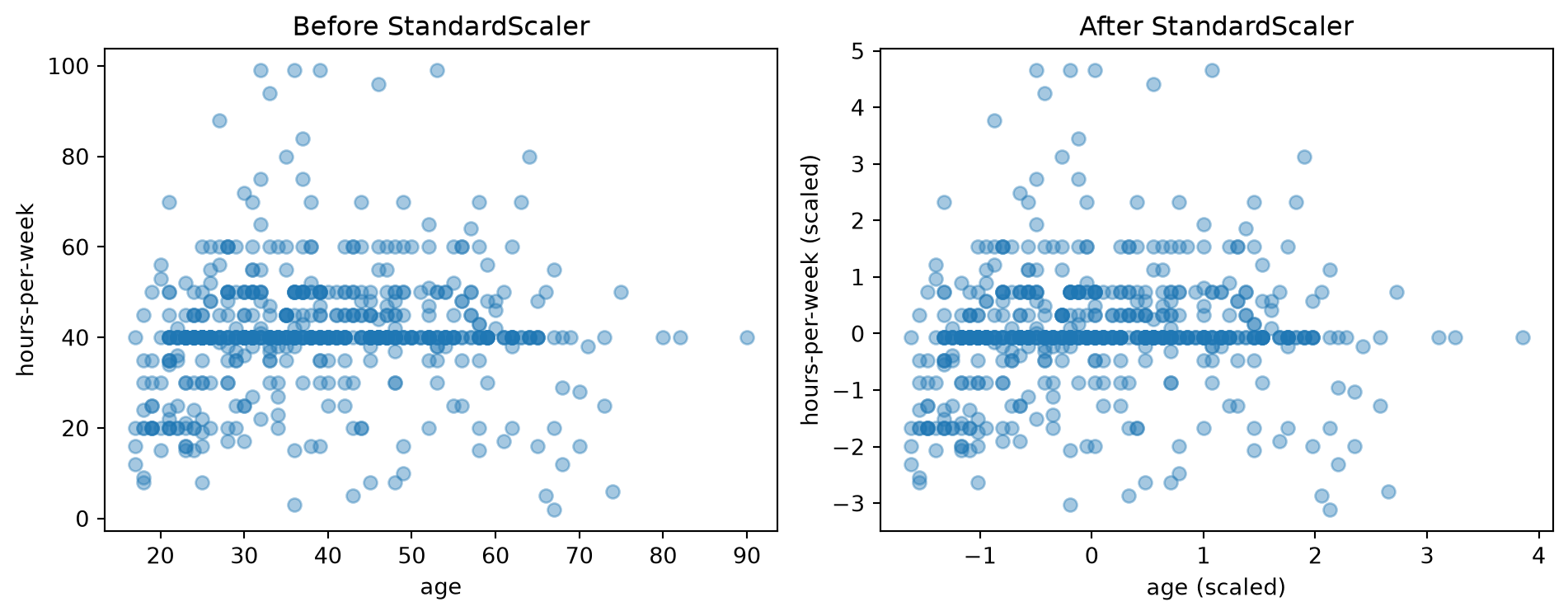
Figure 6.1: Age vs. hours-per-week, before and after StandardScaler. The scaler shifts and rescales the axes; it does not change the shape of the point cloud.

As shown in Figure 6.1, scaling only shifts and stretches the axes; it does not change the relative position of the points.

6.3 The Pipeline syntax

Fitting a scaler and a predictor as two separate steps, and remembering to call .transform() before every .predict(), is exactly the kind of bookkeeping scikit-learn’s Pipeline automates. make_pipeline builds one from a sequence of transformers followed by a predictor:

from sklearn.linear_model import LogisticRegression
from sklearn.pipeline import make_pipeline

model = make_pipeline(StandardScaler(), LogisticRegression())
model
Pipeline(steps=[('standardscaler', StandardScaler()),
                ('logisticregression', LogisticRegression())])
In a Jupyter environment, please rerun this cell to show the HTML representation or trust the notebook.
On GitHub, the HTML representation is unable to render, please try loading this page with nbviewer.org.

make_pipeline names each step automatically from its class name ("standardscaler", "logisticregression"); model.named_steps exposes them by name if you need to inspect one directly.

model.named_steps
{'standardscaler': StandardScaler(),
 'logisticregression': LogisticRegression()}

The resulting pipeline exposes the same .fit()/.predict()/.score() methods as a bare predictor, but under the hood, it does more:

flowchart LR
    subgraph fit["model.fit(X, y)"]
        direction LR
        A1(("X")) --> B1["scaler.fit_transform"] --> C1["predictor.fit"]
        A2(("y")) --> C1
    end

flowchart LR
    subgraph predict["model.predict(X)"]
        direction LR
        A(("X")) --> B["scaler.transform"] --> C["predictor.predict"] --> D(("ŷ"))
    end

Calling model.fit(X, y) calls .fit_transform() on the scaler to learn and apply the scaling, then hands the scaled data to the predictor’s .fit(). Calling model.predict(X) only calls .transform() on the scaler (it must not re-fit the scaler on new data), then the predictor’s .predict().

model.fit(data_train, target_train)
model.score(data_test, target_test)
0.8177777777777778

Does the scaling actually help here? Let’s compare against a LogisticRegression fit directly on the unscaled data.

model.fit(data_train, target_train)
n_iter_scaled = model[-1].n_iter_[0]

unscaled_model = LogisticRegression()
unscaled_model.fit(data_train, target_train)
n_iter_unscaled = unscaled_model.n_iter_[0]

print(f"Iterations with scaling:    {n_iter_scaled}")
print(f"Iterations without scaling: {n_iter_unscaled}")
Iterations with scaling:    8
Iterations without scaling: 59

The number of iterations is larger without scaling, meaning that the optimisation has to work harder to converge.

Warning

An unscaled model that requires more iterations than max_iter will stop before converging, silently returning a suboptimal fit. Before raising max_iter to silence a convergence warning, check whether scaling the data instead fixes the problem.

We can also get a cross-validated estimate of accuracy for the scaled pipeline: cross_validate doesn’t care whether model is a bare predictor or a Pipeline, only that it has .fit()/.predict().

from sklearn.model_selection import cross_validate

cv_results = cross_validate(model, data_numeric, target)
scores = cv_results["test_score"]
print(f"Accuracy: {scores.mean():.3f} ± {scores.std():.3f}")
Accuracy: 0.794 ± 0.019

6.4 Categorical preprocessing

Unlike a numerical variable, a categorical variable takes discrete values from a finite set of possibilities, typically represented as strings. native-country is one example:

data["native-country"].value_counts().sort_index()
native-country
Cambodia                1
Canada                  4
China                   2
Columbia                3
Cuba                    2
Dominican-Republic      1
Ecuador                 2
El-Salvador             4
England                 2
France                  2
Germany                 3
Greece                  1
Guatemala               1
Haiti                   1
India                   2
Italy                   3
Jamaica                 3
Laos                    1
Mexico                 13
Nicaragua               3
Philippines             3
Poland                  8
Portugal                3
Puerto-Rico             5
South                   2
Taiwan                  3
Thailand                1
Trinadad&Tobago         1
United-States         819
Name: count, dtype: int64

Let’s restrict data to the categorical columns.

categorical_columns = [
    "workclass", "education", "marital-status", "occupation",
    "relationship", "race", "gender", "native-country",
]
data_categorical = data[categorical_columns]
print(f"The dataset is composed of {data_categorical.shape[1]} categorical features")
The dataset is composed of 8 categorical features

6.4.1 Encoding ordinal categories: OrdinalEncoder

The most direct strategy is to replace each category with a distinct integer. Let’s try it on a single column first:

from sklearn.preprocessing import OrdinalEncoder

education_column = data_categorical[["education"]]

encoder = OrdinalEncoder().set_output(transform="pandas")
encoder.fit_transform(education_column)
education
0 11.0
1 7.0
2 11.0
3 2.0
4 11.0
... ...
894 12.0
895 1.0
896 15.0
897 15.0
898 12.0

899 rows × 1 columns

The mapping between categories and integers is stored in the fitted categories_ attribute:

encoder.categories_
[array(['10th', '11th', '12th', '1st-4th', '5th-6th', '7th-8th', '9th',
        'Assoc-acdm', 'Assoc-voc', 'Bachelors', 'Doctorate', 'HS-grad',
        'Masters', 'Preschool', 'Prof-school', 'Some-college'],
       dtype=object)]

The same encoder works on the full categorical dataframe, encoding every column independently:

data_encoded = encoder.fit_transform(data_categorical)
print(f"The dataset encoded contains {data_encoded.shape[1]} features")
data_encoded[:5]
The dataset encoded contains 8 features
workclass education marital-status occupation relationship race gender native-country
0 4.0 11.0 2.0 2.0 0.0 4.0 1.0 22.0
1 2.0 7.0 2.0 2.0 0.0 4.0 1.0 28.0
2 2.0 11.0 2.0 2.0 0.0 2.0 1.0 28.0
3 2.0 2.0 4.0 5.0 3.0 4.0 1.0 28.0
4 4.0 11.0 2.0 4.0 0.0 4.0 1.0 28.0
Warning

OrdinalEncoder makes downstream models assume the categories are ordered (0 < 1 < 2 < ...). By default, it orders them lexicographically, which is often meaningless: with categories "S", "M", "L", "XL", the alphabetical order would map them to 2, 1, 0, 3, not the size order we’d want. Use the categories argument to pass an explicit ordering when one exists; when it doesn’t, prefer one-hot encoding instead.

6.4.2 Encoding nominal categories: OneHotEncoder

OneHotEncoder does not imply any order: for a given feature, it creates one new column per category, set to 1 for the category a sample belongs to and 0 for all other categories.

from sklearn.preprocessing import OneHotEncoder

encoder = OneHotEncoder(sparse_output=False).set_output(transform="pandas")
encoder.fit_transform(education_column)
education_10th education_11th education_12th education_1st-4th education_5th-6th education_7th-8th education_9th education_Assoc-acdm education_Assoc-voc education_Bachelors education_Doctorate education_HS-grad education_Masters education_Preschool education_Prof-school education_Some-college
0 0.0 0.0 0.0 0.0 0.0 0.0 0.0 0.0 0.0 0.0 0.0 1.0 0.0 0.0 0.0 0.0
1 0.0 0.0 0.0 0.0 0.0 0.0 0.0 1.0 0.0 0.0 0.0 0.0 0.0 0.0 0.0 0.0
2 0.0 0.0 0.0 0.0 0.0 0.0 0.0 0.0 0.0 0.0 0.0 1.0 0.0 0.0 0.0 0.0
3 0.0 0.0 1.0 0.0 0.0 0.0 0.0 0.0 0.0 0.0 0.0 0.0 0.0 0.0 0.0 0.0
4 0.0 0.0 0.0 0.0 0.0 0.0 0.0 0.0 0.0 0.0 0.0 1.0 0.0 0.0 0.0 0.0
... ... ... ... ... ... ... ... ... ... ... ... ... ... ... ... ...
894 0.0 0.0 0.0 0.0 0.0 0.0 0.0 0.0 0.0 0.0 0.0 0.0 1.0 0.0 0.0 0.0
895 0.0 1.0 0.0 0.0 0.0 0.0 0.0 0.0 0.0 0.0 0.0 0.0 0.0 0.0 0.0 0.0
896 0.0 0.0 0.0 0.0 0.0 0.0 0.0 0.0 0.0 0.0 0.0 0.0 0.0 0.0 0.0 1.0
897 0.0 0.0 0.0 0.0 0.0 0.0 0.0 0.0 0.0 0.0 0.0 0.0 0.0 0.0 0.0 1.0
898 0.0 0.0 0.0 0.0 0.0 0.0 0.0 0.0 0.0 0.0 0.0 0.0 1.0 0.0 0.0 0.0

899 rows × 16 columns

Note

sparse_output=False is used here only so the result prints as an ordinary dense dataframe. With many categorical columns, one-hot encoding produces mostly-zero matrices, for which scikit-learn’s default sparse output is far more memory-efficient.

Applied to the whole categorical dataframe:

data_encoded = encoder.fit_transform(data_categorical)
data_encoded[:5]
workclass_Federal-gov workclass_Local-gov workclass_Private workclass_Self-emp-inc workclass_Self-emp-not-inc workclass_State-gov education_10th education_11th education_12th education_1st-4th ... native-country_Nicaragua native-country_Philippines native-country_Poland native-country_Portugal native-country_Puerto-Rico native-country_South native-country_Taiwan native-country_Thailand native-country_Trinadad&Tobago native-country_United-States
0 0.0 0.0 0.0 0.0 1.0 0.0 0.0 0.0 0.0 0.0 ... 0.0 0.0 0.0 1.0 0.0 0.0 0.0 0.0 0.0 0.0
1 0.0 0.0 1.0 0.0 0.0 0.0 0.0 0.0 0.0 0.0 ... 0.0 0.0 0.0 0.0 0.0 0.0 0.0 0.0 0.0 1.0
2 0.0 0.0 1.0 0.0 0.0 0.0 0.0 0.0 0.0 0.0 ... 0.0 0.0 0.0 0.0 0.0 0.0 0.0 0.0 0.0 1.0
3 0.0 0.0 1.0 0.0 0.0 0.0 0.0 0.0 1.0 0.0 ... 0.0 0.0 0.0 0.0 0.0 0.0 0.0 0.0 0.0 1.0
4 0.0 0.0 0.0 0.0 1.0 0.0 0.0 0.0 0.0 0.0 ... 0.0 0.0 0.0 0.0 0.0 0.0 0.0 0.0 0.0 1.0

5 rows × 85 columns

print(
    f"The encoded dataset contains {data_encoded.shape[1]} features, "
    f"up from {data_categorical.shape[1]} original categorical columns"
)
The encoded dataset contains 85 features, up from 8 original categorical columns

The column count jumps well above the original number of categorical columns, because columns like occupation or native-country each have many possible values, and every one of them gets its own 0/1 column.

NoteChoosing between the two encoders

OneHotEncoder is the usual choice when the downstream model is linear, since it avoids imposing a false ordering. OrdinalEncoder is often fine for tree-based models, which don’t rely on distances between encoded values, and it avoids the column explosion one-hot encoding causes with high-cardinality columns.

6.4.3 A rare-category problem

data["native-country"].value_counts().tail()
native-country
Greece                1
Laos                  1
Guatemala             1
Haiti                 1
Dominican-Republic    1
Name: count, dtype: int64

Some countries appear only once or twice in this data. If such a row appears in the test set during cross-validation, the encoder (trained only on the training set) has never seen that category and would not know how to encode it at prediction time. Passing handle_unknown="ignore" to OneHotEncoder handles this: an unseen category is encoded as all-zeros for that feature’s columns, instead of raising an error.

6.4.4 Fitting a pipeline on the categorical features

model = make_pipeline(
    OneHotEncoder(handle_unknown="ignore"), LogisticRegression(max_iter=500)
)
cv_results = cross_validate(model, data_categorical, target)
scores = cv_results["test_score"]
print(f"Accuracy: {scores.mean():.3f} ± {scores.std():.3f}")
Accuracy: 0.809 ± 0.028
Note

max_iter is raised here because, unlike the scaled numerical features above, one-hot encoded columns are already all on the same 0/1 scale (they wouldn’t benefit from StandardScaler), so increasing max_iter is the right way to help the solver converge.

This categorical-only pipeline scores comparably to, or better than, the numerical-only pipeline from earlier, mostly because it has many more (predictive) columns to work with, one per category value.

6.5 Combining numerical and categorical preprocessing

So far, we’ve scaled the numerical columns and encoded the categorical columns in two separate pipelines, each ignoring the other kind of column. ColumnTransformer applies a different transformer to a different subset of columns, then concatenates the results into a single feature matrix, so one pipeline can use both numerical_columns and categorical_columns, defined earlier, at once.

ColumnTransformer takes a list of (name, transformer, columns) triples: each transformer is fit and applied only to its own subset of columns.

from sklearn.compose import ColumnTransformer

preprocessor = ColumnTransformer([
    ("standard-scaler", StandardScaler(), numerical_columns),
    ("one-hot-encoder", OneHotEncoder(handle_unknown="ignore"), categorical_columns),
])

preprocessor is itself a transformer, with a .fit_transform(), so it can be the first step of a Pipeline, exactly like StandardScaler or OneHotEncoder were on their own:

Note

data has a couple of columns (fnlwgt, educational-num) that appear in neither numerical_columns nor categorical_columns. By default, ColumnTransformer silently drops any column not listed in one of its transformers, so passing the whole data below is fine; only the two listed groups reach the model.

model = make_pipeline(preprocessor, LogisticRegression(max_iter=500))
model
Pipeline(steps=[('columntransformer',
                 ColumnTransformer(transformers=[('standard-scaler',
                                                  StandardScaler(),
                                                  ['age', 'capital-gain',
                                                   'capital-loss',
                                                   'hours-per-week']),
                                                 ('one-hot-encoder',
                                                  OneHotEncoder(handle_unknown='ignore'),
                                                  ['workclass', 'education',
                                                   'marital-status',
                                                   'occupation', 'relationship',
                                                   'race', 'gender',
                                                   'native-country'])])),
                ('logisticregression', LogisticRegression(max_iter=500))])
In a Jupyter environment, please rerun this cell to show the HTML representation or trust the notebook.
On GitHub, the HTML representation is unable to render, please try loading this page with nbviewer.org.
cv_results = cross_validate(model, data, target)
scores = cv_results["test_score"]
print(f"Accuracy: {scores.mean():.3f} ± {scores.std():.3f}")
Accuracy: 0.834 ± 0.018

This combined pipeline uses both groups of columns at once, numerical and categorical, and its cross-validated accuracy improves on both single-kind pipelines from earlier.

6.6 Main takeaways

  • StandardScaler shifts and rescales numerical columns to comparable ranges. It helps distance-based models and speeds up gradient-based solvers, without changing the relative position of the data points.
  • OrdinalEncoder maps each category to an integer, which implies an order on the categories, so use it only when that order is meaningful (or a tree-based model is downstream).
  • OneHotEncoder maps each category to its own 0/1 column, avoiding a false order at the cost of many more columns; handle_unknown="ignore" keeps it robust to categories only seen at prediction time.
  • A Pipeline (built with make_pipeline) chains transformers and a predictor into one object: .fit() fits and applies every transformer in sequence before fitting the predictor. In contrast, .predict() only applies (never refits) the transformers before calling the predictor’s .predict().
  • ColumnTransformer applies different transformers to different groups of columns and concatenates the results, so numerical and categorical preprocessing can happen side by side in one step.
  • Tools like cross_validate treat a Pipeline exactly like any other predictor, since both only need .fit()/.predict().

  1. Recall that a transformer is any estimator with a .transform() method.↩︎